Launch Your Life Sim with a Polished Social Media Countdown
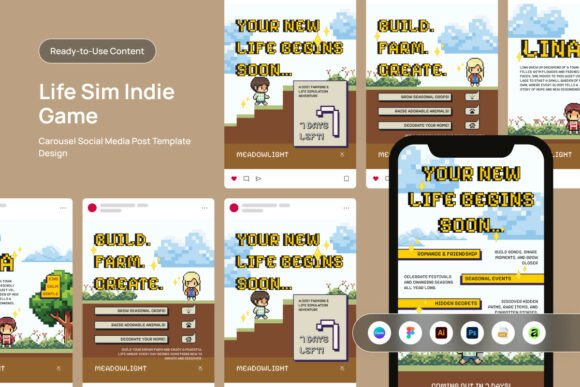
Building momentum for an indie life sim launch shouldn't feel like a struggle that pulls you away from your dev logs and coding milestones. This countdown carousel template is built for studios and community managers who need to turn a standard release date into a high-engagement event across Instagram, Twitter, and Discord. It handles the heavy lifting of visual storytelling, allowing you to drive Steam wishlists and foster player anticipation through a polished, cohesive aesthetic that resonates deeply with the cozy gaming audience.
Whether you are counting down to a public playtest or the final release day, this tool provides the professional edge needed to transform casual browsers into a dedicated day-one player base. It's more than just a set of graphics; it's a strategic design asset for your Life Sim Indie Game Launch Social Media campaign, ensuring every post looks intentional and on-brand.
Designed for Flexibility and Professional Polish
This package is built with versatility at its core. It includes seven distinct layout designs, giving you creative options to keep your countdown content fresh and engaging. The files are provided in the two most crucial portrait sizes for modern social platforms: a 1080x1350 pixel carousel format perfect for Instagram's grid and feed, and a 1080x1920 pixel story size for immersive full-screen updates.
Every element is fully editable. You can change text, colors, and objects to match your game's unique palette and typography. The templates use free fonts, removing any additional cost or licensing hurdles. Compatibility is comprehensive, with files for Adobe Illustrator, Adobe Photoshop, Canva, and Figma. This means your team can work in their preferred environment, whether that's a professional studio suite or a cloud-based design platform like Canva.
Practical Applications Beyond the Launch
While designed for a game launch, the utility of a well-crafted social media template extends to numerous creative projects. Think about how you might repurpose these designs:
- Brand Identity & Logo Design: Use the layout structures to present logo concepts or brand style guides to clients or your community.
- Editorial & Poster Design: The clean layouts are ideal for creating event posters, blog feature graphics, or digital magazine spreads.
- Packaging & Merchandise: Mock up how your game's art style could look on physical merchandise or special edition packaging.
- Web Design & Digital Products: The visual language can inform website hero sections, newsletter banners, or assets for digital storefronts.
The value lies in having a premium font and design system that ensures visual consistency. When your social media graphics, website, and promotional materials share a common typographic and color language, it strengthens brand recognition and presents a professional front to your audience.
Tips for Choosing and Using Design Assets
When selecting any design asset, consider these practical points to ensure it fits your project:
Check Readability: A beautiful display font or script font might look stunning, but ensure it remains legible at small sizes, especially for body text on mobile screens. For a cozy game, a friendly sans serif font or a warm handwritten font can be perfect, but always test it.
Match the Mood: The typography should reflect your game's personality. Is it whimsical and soft? Consider rounded, gentle typefaces. Is it more modern and sleek? A clean modern typography set might work best. This template's editable nature allows you to find the perfect font pairing that captures your world's essence.
Review the License: This kit uses free fonts, which is ideal for most projects. However, for any commercial font you consider elsewhere, always verify the license covers your intended use, whether for digital social media graphics or physical packaging design.
Investing in high-quality, editable creative fonts