Gold Game with Diamond Stone Text Effect
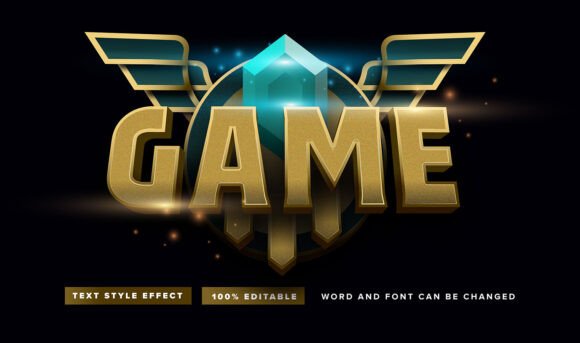
Imagine transforming ordinary text into a statement of luxury and prestige with a single click. The Gold Game with Diamond Stone Text Effect offers exactly that—a sophisticated design asset that elevates typography beyond simple letters into a compelling visual element.
This is not a traditional font family you select from a dropdown menu. Instead, it is a highly versatile font effect designed specifically for Adobe Illustrator. Provided in the universal EPS file format, it allows for complete creative control. The core appeal lies in its 100% editable nature and straightforward application. Designers can easily modify the underlying text, adjust the gold and diamond stone textures, and fine-tune the effect to match their specific vision without complex layering or manual styling.
Practical Applications for Elevated Design
The true value of a premium text effect like this is measured by its utility across various creative projects. Its ornate, high-impact appearance makes it particularly well-suited for designs that aim to convey exclusivity, celebration, or high value.
- Brand Identity & Logo Design: Instantly craft a memorable logotype for brands in the luxury, entertainment, or jewelry sectors. The effect can set a powerful tone for a brand's entire visual identity.
- Poster & Editorial Design: Create stunning headlines for event posters, magazine covers, or book titles that demand attention. It works exceptionally well for themes related to sports, awards, or fantasy.
- Packaging & Social Media Graphics: Design eye-catching product labels or social media posts for promotions, launches, and special announcements. The metallic and gemstone textures translate beautifully to digital and print mediums.
- Merchandise & Invitations: From custom apparel to luxurious event invitations, this effect adds a bespoke, professional touch that generic fonts cannot achieve.
Integrating the Effect into Your Workflow
Using the Gold Game with Diamond Stone Text Effect is designed to be intuitive. Within Adobe Illustrator, you simply apply the effect to your chosen text object. The real magic happens in the appearance panel, where you can delve into the effect's properties to customize everything from the bevel depth of the gold to the sparkle of the diamond stones.
For the most polished results, consider these practical tips:
- Readability is Key: While decorative, ensure the final text remains legible, especially at smaller sizes. Test it at the intended scale before finalizing.
- Mood Matching: Align the effect's opulent feel with your project's overall theme. It complements modern typography when used strategically for key headlines.
- Font Pairing Strategy: Balance the ornate effect with a clean, simple sans serif or serif font for body text. This creates a harmonious hierarchy and prevents visual overload.
- License Verification: Always confirm the font download license covers your intended use, whether for personal projects or commercial client work.
Choosing the right design assets is about more than aesthetics; it's about finding tools that enhance your creative process and deliver consistent, professional results. A well-crafted effect like this provides a reliable way to add a layer of sophistication to your work, helping to strengthen brand recognition and create a more engaging visual narrative. By focusing on editable, high-resolution assets, designers can maintain flexibility while achieving a polished, premium look across all their projects.